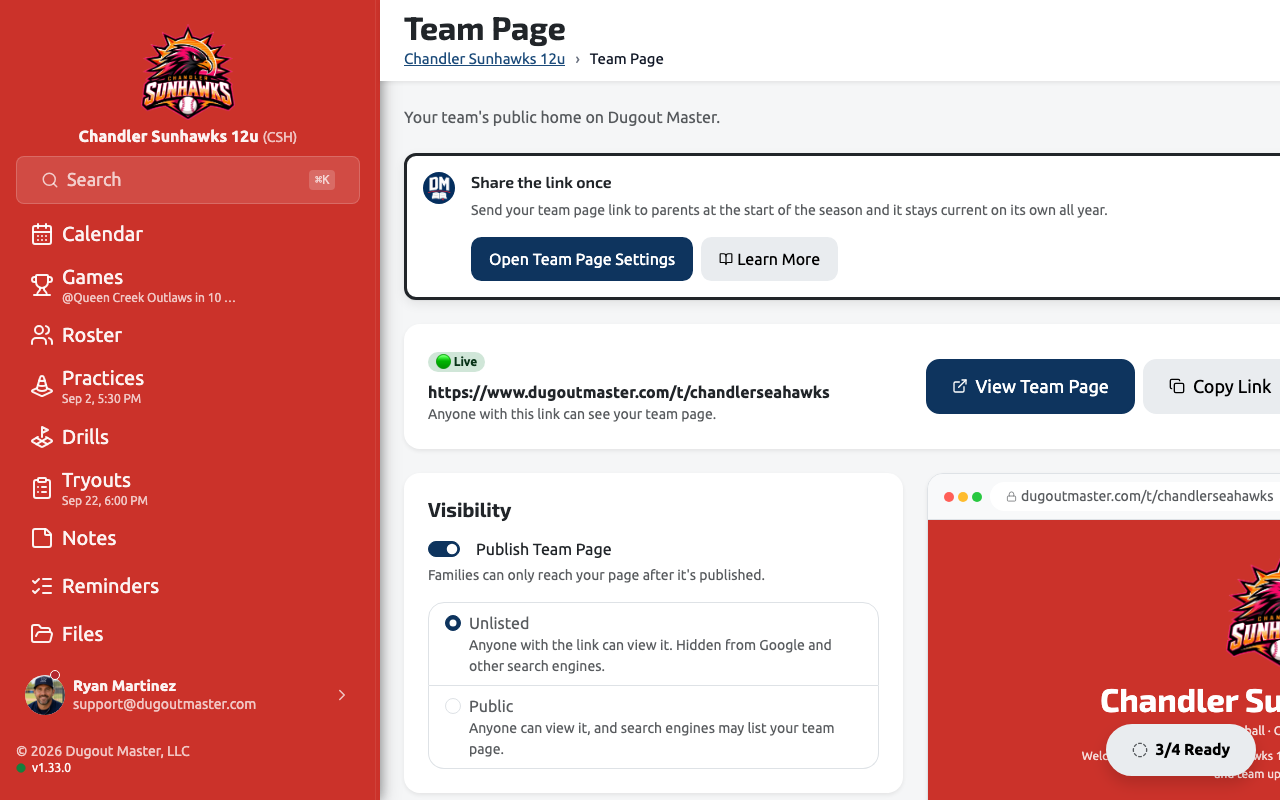
Sharing Your Team Page
Your Team Page is a public, read-only home for your team — schedule, events, and announcements at one link, with no login required. Send it to families once and it stays current on its own as you make changes in the app.
Why a Team Page
Section titled “Why a Team Page”- Share one link — send families straight to your team instead of chasing group chats.
- Always up to date — your schedule, events, and announcements publish themselves as you change them in Dugout Master, so there’s nothing separate to update.
- No website required — Dugout Master hosts the page, the custom URL, and the QR code for you. There’s nothing to build or maintain.
Claiming your URL
Section titled “Claiming your URL”Go to Team Page in the sidebar. The first time you visit, Dugout Master proposes a URL based on your team name — accept it or type your own, and it’s checked for availability as you type. Your page lives at dugoutmaster.com/t/your-url.
Only the team owner can claim or change the URL, to keep shared links and QR codes consistent. Assistant coaches can see the settings but not edit them.
Publishing and visibility
Section titled “Publishing and visibility”The page is saved as a draft until you flip Publish Team Page on — nothing is reachable until then. Once published, choose:
| Visibility | Who can see it |
|---|---|
| Unlisted | Anyone with the link. Hidden from Google and other search engines. |
| Public | Anyone with the link, and search engines may list it. |
Either way the link itself isn’t a secret — don’t rely on Unlisted to keep something private. Nothing internal (lineups, game details) is ever shown regardless of visibility.
Sharing the link
Section titled “Sharing the link”Once your page is live, use Copy Link or QR Code at the top of the settings page to hand it out — print the QR code on a schedule handout, or drop the link straight into a group text or email at the start of the season.
What’s on the page
Section titled “What’s on the page”Toggle each section on or off independently:
- Welcome message — a short intro, auto-generated from your team name and age group unless you write your own
- Announcements — your latest published team announcement
- Events — every published event (tryouts, clinics, lessons, camps…) with its register button, dated or not — see Events Overview
- Upcoming schedule — only opponent, date, time, and location; lineups and other game details stay private
- Team contact email — optional, off by default
Appearance
Section titled “Appearance”The Appearance section customizes your logo, colors, cover photo, and header style, with a live preview beside the settings.