
Batting Order
The sequence in which players bat. Set once per game and shared across all innings.
The lineup board is the heart of Dugout Master. This page walks you through the full flow for a single game.
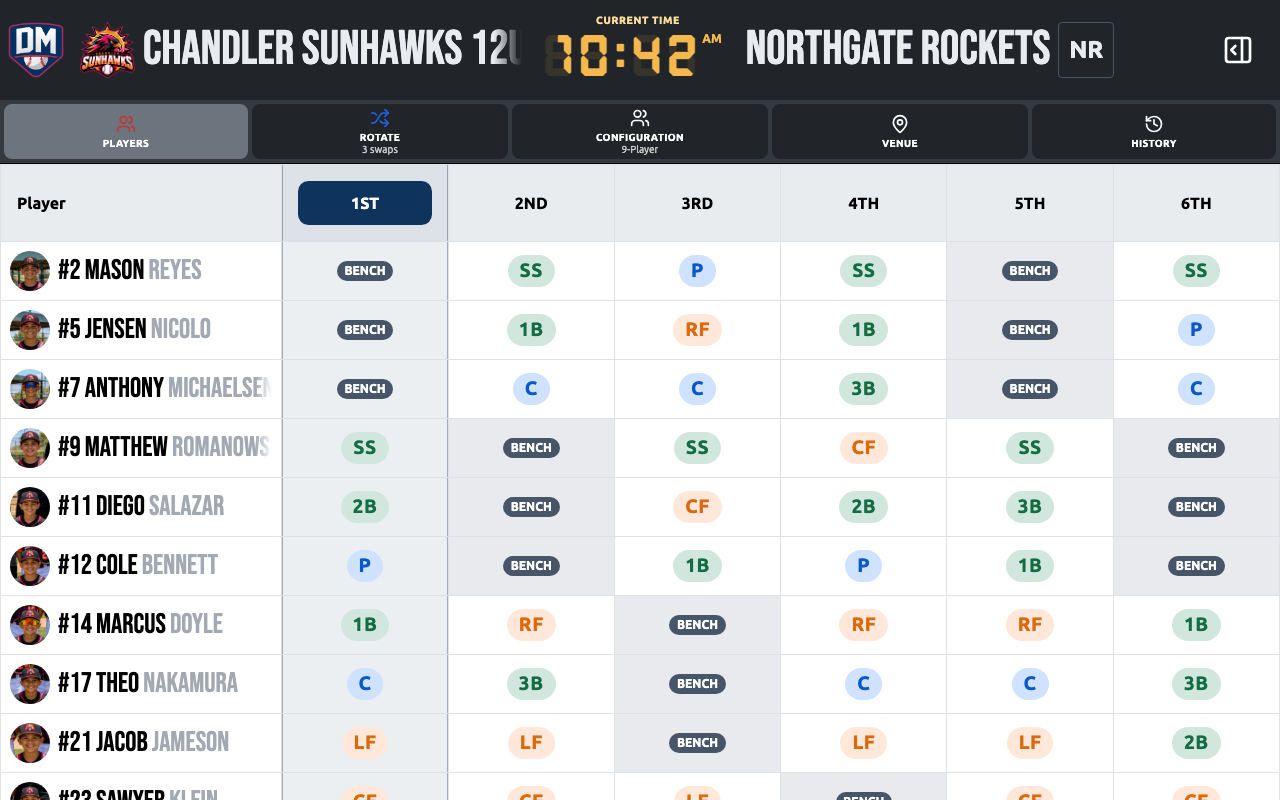
A lineup in Dugout Master has three parts:
Batting Order
The sequence in which players bat. Set once per game and shared across all innings.
Defensive Positions
Where each player stands on the field. Set per inning so you can rotate players throughout the game.
Bench
Players sitting out a given inning. Dugout Master tracks bench time to help you keep playing time fair.
Open a game and tap Edit Lineup.
Drag players into batting order. The order is displayed as a numbered list on the left rail of the lineup board.
Tap Done to save the batting order.
On the lineup board, tap a position on the field diagram (e.g., Pitcher, Shortstop).
The player rail highlights eligible players. Tap a player to assign them.
Repeat for each position. The inning card updates to show how many slots are filled.
Players not assigned to a field position are shown as bench for that inning.
Tap Add Inning to create the next inning. You can:
Dugout Master automatically tracks how many innings each player has sat. The bench fairness indicator warns you if a player is being benched more than average.
See Bench Management for the full details.
After the game, tap the scoreboard header or open the game menu and choose Set Result to record the outcome. You can enter a score (result is calculated automatically) or just pick Win / Loss / Tie.
See Game Results for details.