
Games Overview
A game in Dugout Master is a single matchup, managed from the Game Workspace — a single unified view that replaced the old separate Full Game View, Game Details, and Lineup setup pages. Each game contains:
- Basic info (opponent, date, home/away, competition, location)
- A lineup board with per-inning assignments
- A game result (win, loss, tie, or forfeit)
- Optional notes and warm-up drills
A meta bar above the field diagram surfaces the game’s competition, date, location, weather, and warmup at a glance — tap any pill to edit it. It opens the same drawer that holds Game Info, Edit Game, and the Clock (see Editing a game), so opponent, location, field, and start time are all editable without leaving the workspace. The clock also has a Game progress mode that shows a progress bar for how far into the scheduled game length you are.
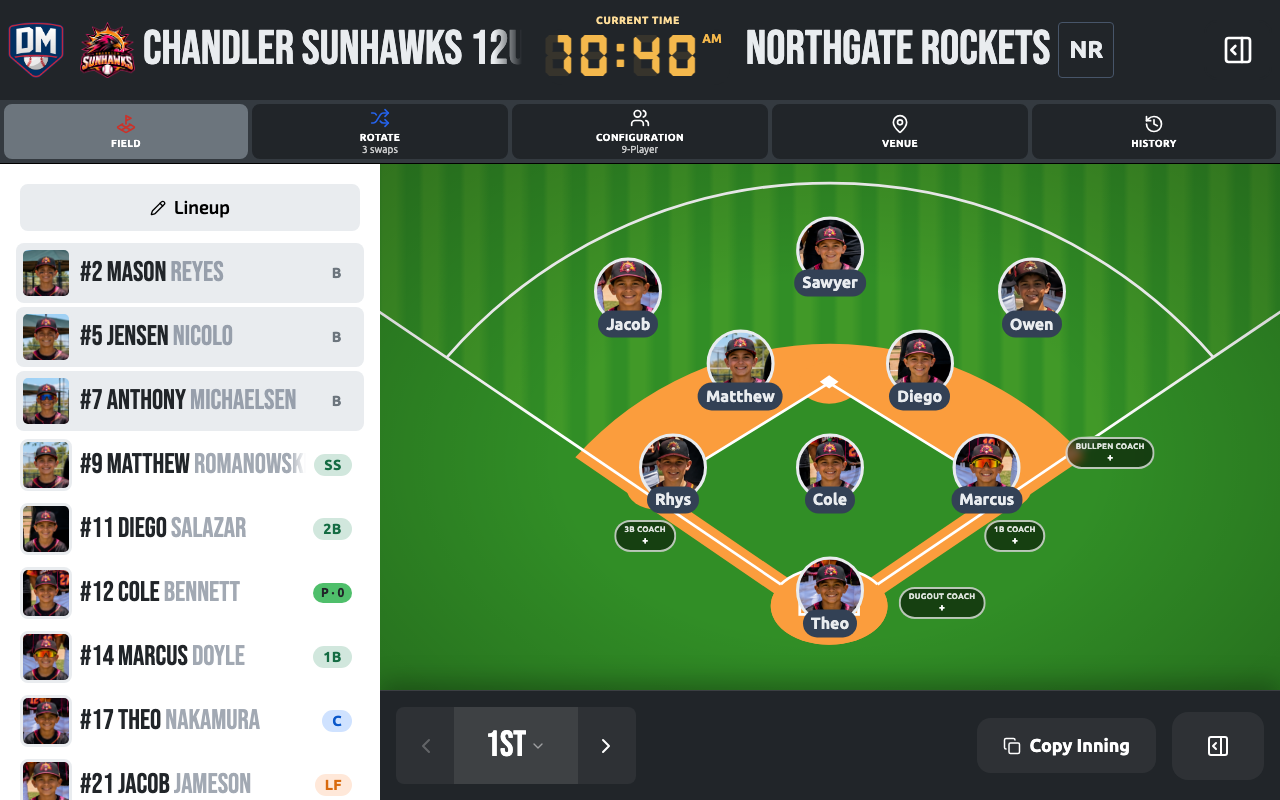
Game Day Command Bar
Section titled “Game Day Command Bar”A toolbar sits under the game header on every view, so switching between Field, Players, and Positions is always one tap away. Game Plan sits with Warm-up as a second tier — still one tap, just a review sheet rather than a way of working the field, so it’s grouped after the tools you use to build the lineup rather than beside them. Game History closes out the bar, reachable from every view instead of being buried in a menu. On phones and smaller tablets, the toolbar collapses to a single view selector that always names the view you’re on — Field and Game Plan are the two views a phone can switch to; Players and Positions need a larger screen.
Between the views and Game Plan, three chips give you an at-a-glance read on the lineup you’re building:
- Rules — flags anything the lineup rules aren’t happy with (an unfilled position, a duplicate assignment, a safety-rule conflict). Tap it to open the details.
- Rotate — a neutral bench-time indicator, never a red warning — it surfaces fair-rotation opportunities, not failures.
- Configuration — the current field configuration (9-player, 10-player, and so on). Tap it to switch configurations without leaving the view you’re on.
You can also mark a game as a scrimmage from Game Settings so it doesn’t count toward stats.
Game lifecycle
Section titled “Game lifecycle”Scheduled → In Progress → Completed| State | Description |
|---|---|
| Scheduled | Game exists but hasn’t started |
| In Progress | Game clock is running; lineup board is active |
| Completed | Game time has elapsed; result can be recorded |
Accessing a game
Section titled “Accessing a game”Games appear in the Games list sorted by date. Tap any game to open the lineup board.
Game menu
Section titled “Game menu”The ··· menu in the game header gives you access to everything that isn’t a view or a toolbar chip:
- Edit Lineup, Game Settings — the same drawers described in Creating & Editing a Game
- Game Summary — record or update the final score (Game Results)
- Replay Game (Pro) — step back through a completed game’s history (Game History & Undo/Redo)
- Duplicate Game
- Share Game, Share Lineup (both Pro), Print — see Sharing and printing a game
- Reminders — jump to any reminders linked to this game
- Add to Calendar — downloads an .ics file for the game
- Lock Game (Pro) — Live Game Mode, so the tablet can be handed around
- Delete Game, Exit Game
On a phone, Warm-Up also lives here — on a larger screen it’s a persistent toolbar button instead.