
Adding Players
Your roster is the list of players available to be placed in a lineup. You can add players manually or import them from GameChanger.
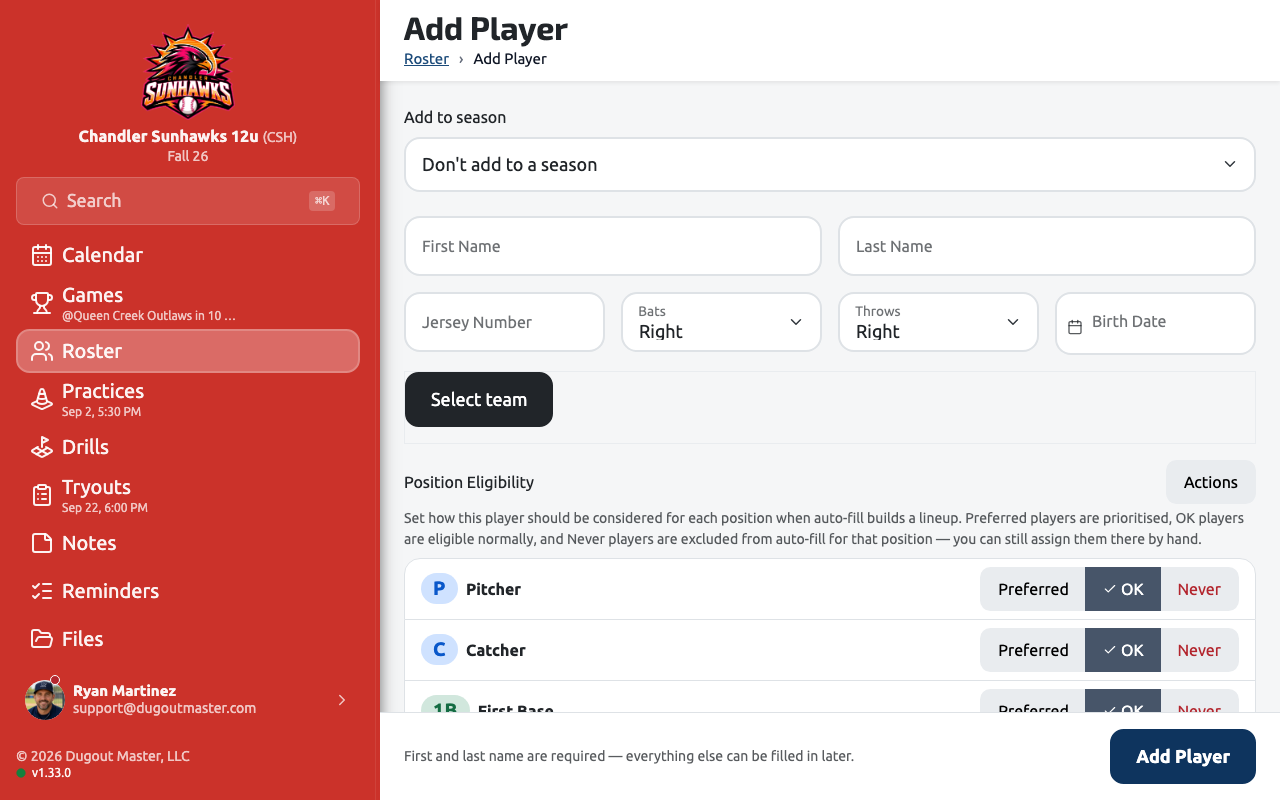
Adding a player manually
Section titled “Adding a player manually”-
Open your team and go to the Roster tab.
-
Tap Add Player.
-
Fill in the player details:
- Name — First and last name
- Jersey number — Displayed on lineup boards
- Throwing hand — Right or Left
- Batting hand — Right, Left, or Switch
- Photo (optional) — Appears on the lineup board and player cards
-
Tap Save Player.
Importing from GameChanger
Section titled “Importing from GameChanger”If your team already uses GameChanger, you can import your roster via CSV export.
Go to Roster → Import → GameChanger CSV and follow the on-screen steps.
Player availability
Section titled “Player availability”Each player has an availability status that you can set per game. Available states are:
| Status | Description |
|---|---|
| Available | Player will appear in the lineup builder |
| Unavailable | Player is hidden from lineup suggestions |
You can update availability from the player’s profile or directly from the lineup builder before a game.
What’s next?
Section titled “What’s next?”Once you have players on your roster, create your first game.