
Lineup Boards Overview
The lineup board is the main interface you use during a game. It shows:
- The field diagram with position slots
- Your batting order in the left rail
- Bench players for each inning
- Pitch counts (if enabled)
- Batting pipeline (on-deck, in-hole)
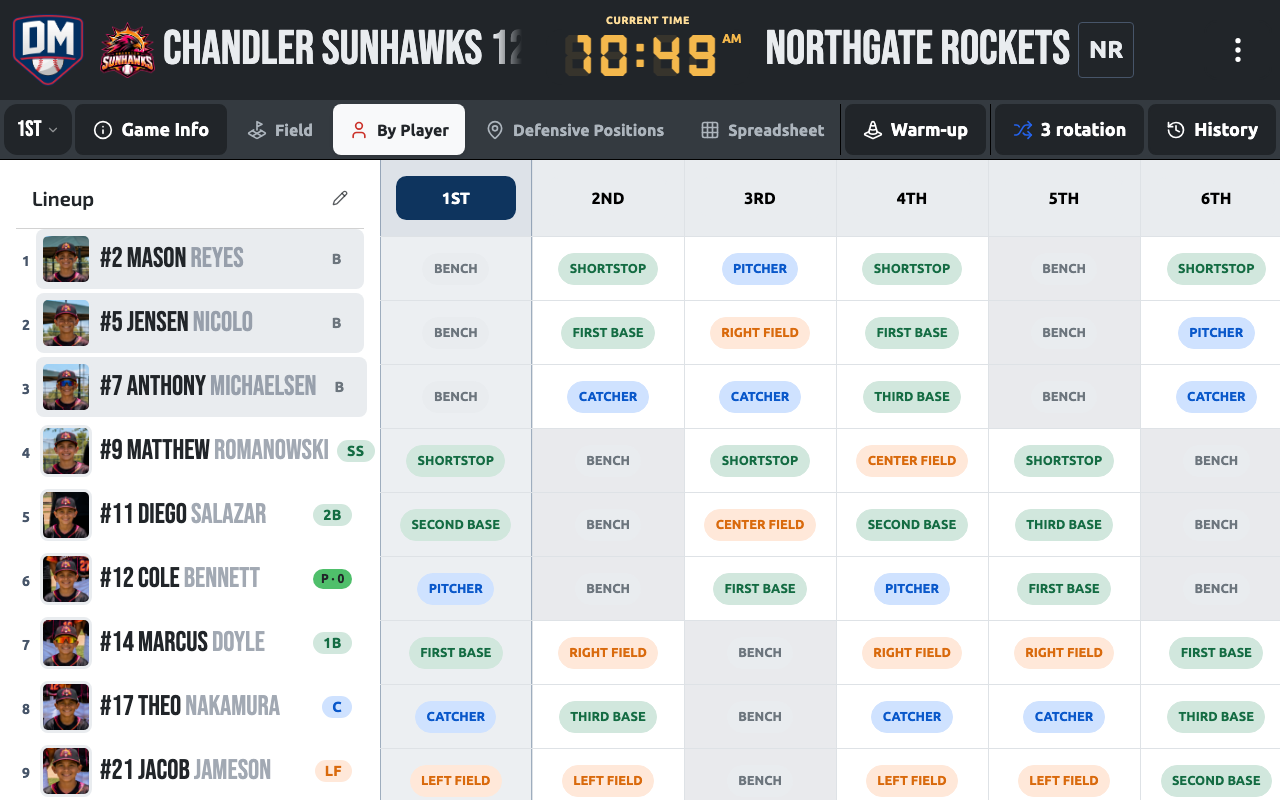
A segmented switcher continues the game header chrome and lets you jump between Field, Players, Positions, and Game Plan views — your team color marks whichever view is active.
Inline lineup editing
Section titled “Inline lineup editing”In the Players view, you can edit the lineup right in the grid — tap any cell to assign a position, with keyboard navigation for moving between cells. The Assign Position picker that opens works the same way it does on the Dugout, so switching between views doesn’t mean relearning the controls.
The batting order is always reorderable — there’s no “Edit Order” toggle to switch on first.
Board layout
Section titled “Board layout”[ Batting Order ] [ Field Diagram ] [ Innings Rail ] (left) (center) (right)On mobile, the layout adapts to portrait and landscape orientations. In landscape mode, the field and batting order are shown side by side for a full game view.
Inning navigation
Section titled “Inning navigation”Use the inning tabs on the right rail to switch between innings. Each inning has its own defensive assignments while the batting order remains the same.
Read-only mode
Section titled “Read-only mode”When you’re offline or viewing a game you don’t own, the lineup board enters read-only mode. You can see all assignments but cannot make changes.